
- Software
- Zencrack Support
Licensing
Zencrack Support
Licensing
Licensing for Zencrack is available on a license server or nodelocked basis. The licensing component of Zencrack uses the Reprise License Manager (RLM) to control access to the program via a license file.
License server
The license server, sometimes called the license manager, is installed on a specified computer which is referenced in the license file.
The Zencrack program may be installed and executed on any computer that has access to the license server across a network. This is referred to as a client installation.
At run-time the Zencrack job on the client installation attempts to check out license tokens from the license server and the job runs provided that tokens are available. If insufficient tokens are available because another job is running, the job can be queued until tokens are available. The total number of available license tokens controls the number of concurrent jobs that can be executed.
Nodelocked
The program will only execute on the computer listed in the license file.
One Zencrack job can execute at a time.
Required information
For either licensing method, a license file must be installed to run Zencrack. This file is sent to users via e-mail. In order to create a license file we require a variety of information which we gather from you via a supplied utility program called machine_id.exe:
For both license types
We need to know the required finite element interface(s) for the installation.
We need some information about the target machine for the license (for example, whether it will be a license server or nodelocked machine).
License server
Network licensing uses license tokens to allow jobs to execute. Any number of tokens can be purchased and the total number of license tokens control the number of concurrent jobs that can execute.
One token is required to run a Zencrack Standard job and three tokens are required to run a Zencrack Professional job.
So, for example, six tokens allow six concurrent Standard jobs (i.e. without crack growth), or two concurrent Professional jobs (i.e. with crack growth), or one Professional job and up to three Standard jobs.
We need to know how many license tokens you require.
Nodelocked
Nodelocked licenses must specify either Zencrack Standard (i.e. without crack growth) or Zencrack Professional (i.e. with crack growth).
Note that a Professional licence also allows Standard runs.
We need to know whether you require Zencrack Standard or Zencrack Professional.
In order to collect all of the required data, a program called machine_id.exe must be used. This program is supplied with an associated RLM utility executable, rlmutil. Both machine_id and rlmutil must be in the same folder before executing machine_id.exe. The machine_id program should be run on the target Zencrack machine for nodelocked licenses or on the server machine for license server configurations. The program generates a file called zencrack.txt in the folder containing the machine_id executable. The zencrack.txt file should be sent to Zentech.
For installations made using the Zencrack installer packages, the machine_id and rlmutil programs are installed in the machine_id folder of the Zencrack program installation and are also installed with the RLM license server files if the RLM server is installed. The machine_id and rlmutil programs can also be downloaded in a stand-alone zip file from the links further down this page without the need to install other Zencrack components.
In the case of Windows laptop PCs which may have multiple network cards, the program should be run with the laptop configured in the way that it will be used with Zencrack. Note that a laptop may shutdown the network adapter to conserve power when running off a battery. You should configure your system to prevent this as per the system documentation.
Full details of the supported platforms is available here.
The machine_id licensing program
Stand-alone downloads for the machine_id licensing program are available below.
machine_id for 64bit Windows (x86-64)
Save the Windows machine_id zip file in a folder on the target machine.
Extract the two executable files machine_id.exe and rlmutil.exe into a folder on your computer.
Double-click the icon of the machine_id executable in this folder to run it.
Answer the questions to generate the zencrack.txt file.
machine_id for 64bit Linux (x86-64)
Save the Linux machine_id zip file in a directory on the target machine.
Extract the two executable files machine_id.exe and rlmutil into a folder on your computer.
Ensure the files both have execute status.
Run the machine_id executable from a terminal window using ./machine_id.exe.
Answer the questions to generate the zencrack.txt file.
machine_id version information
These downloads are for version 6.2 of the machine_id program. The version can be checked from the first line written to the screen when the program executes or via the first line in the generated zencrack.txt file:
[Windows/x86 : machine_id version 6.2]
or
[Linux/x86 : machine_id version 6.2]
License file for the downloadable Zencrack Evaluation Version
The downloadable Evaluation Version of Zencrack which is available here must be configured during installation by selecting the 'Free - restricted evaluation mode' option on the licensing screen. You do not need to follow the procedures above to send us information about your machine when using this evaluation version.
Port definitions for the license server
When using the license server for a Zencrack installation there are two port numbers associated with operation of the server. Usually these ports do not need to be changed. The information below explains more about the ports and what to do if they need to be changed. For further information about the configuration of the license server please refer to the Installation And Execution Manual. This manual is available as part of the documentation installation for your Zencrack version. The manual can also be found in the relevant Zencrack version support page.
Overview
The license server contains two main components which operate via two TCP ports:
- rlm.exe - the rlm server. This defaults to using port 2764. This port number can be changed on the HOST line in the license file. Each client installation must reference this port number in their zencrack.ini file in order to obtain a license, so if the port number is changed from the default, all client installations must be changed to be consistent.
- zentechint.exe - the ISV server. This defaults to using a random system assigned port number. The port number can be set to a fixed value on the ISV line in the license file. Client installations do not need to know this port number.
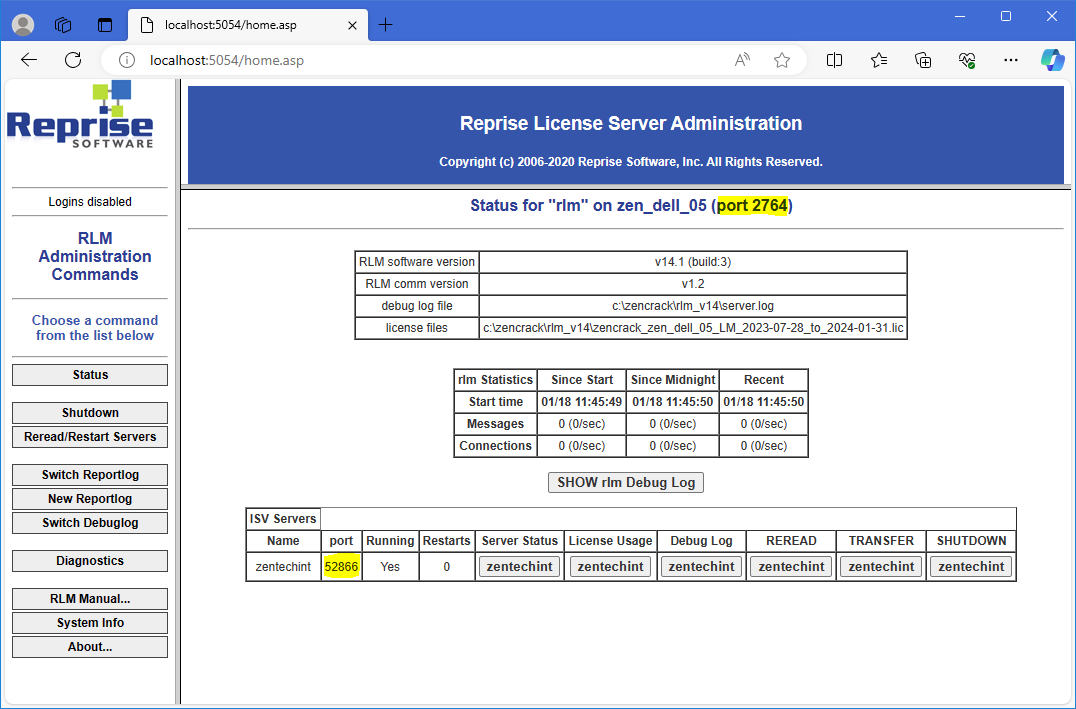
If the license server is running, then the RLM web browser utility should be available on port 5054 on the license server machine. Selecting Status in the left-hand pane will show information similar to the screenshot below.
To access the RLM web browser utility enter the following in a web browser address bar on the license server machine:
- localhost:5054
The two port numbers being used in the example screenshot below are:
- Port 2764 - Associated with the rlm server itself. The default port number defined in the license file.
- Port 52866 - Associated with the zentechint 'ISV server'. A random system assigned port number.
As noted above, both of these ports can be defined in the license file. Each license file contains one HOST line and one ISV line. For example:
HOST ZEN_DELL_05 34e6d71e7d82 2764
ISV zentechint
When issuing license files we ALWAYS include port 2764 on the HOST line and NEVER include a port number on the ISV line. The system then assigns a port for the zentechint ISV server component. To include a specific port for the zentechint component of the server on the ISV line the license file may be edited and a port= option added. For example, to ensure that port 49600 is always used:
ISV zentechint port=49600
What is port 2764 used for?
Port number 2764 on the HOST line in the license file that we supply to you is for the rlm server.
This value is required in the zencrack.ini file on client machines to tell client installations how to find the license server on the network. The zencrack.ini file is located in the tools sub-folder of the client installation. Port number 2764 is placed into the zencrack.ini file by the client installation process - the port number cannot be changed during a client installation. An entry in the zencrack.ini file after installation may look like this:
ZENCRACK_RLM_SERVER = [email protected]
where the license server network address is 192.168.1.10.
If you change the HOST line in the license file to use a different port, you must edit the zencrack.ini file on each client machine after the installation process completes to set the consistent alternative port number on the ZENCRACK_RLM_SERVER line.
In general, there should be no reason to change this port number.
What is the zentechint server?
The license server contains an executable zentechint.exe which operates on a system assigned port number if no value is specified on the ISV line in the license file.
If a specific port= entry is added to the license file, as described in the Overview section above, and the license server restarted, the port specified in the license file would be used and show on the Status page of the RLM web browser utility.
It may be required to set this port to a fixed value if the port method is used in firewall settings, as described in the Firewall section below.
Do the ports need to be changed?
It may be necessary for a customer to specify ports if they want to control port access on the server machine (for example to satisfy firewall restrictions).
Setting port numbers on the HOST or ISV lines of the license file does not affect the validity of the file.
If you change port settings in the license file you must remember to make the same changes if you receive a new license file e.g. for a new Zencrack version or for a lease extension.
How do I find out which ports are being used by the license server?
Using the RLM web browser utility (as described in the Overview of this section) to verify the two ports that are being used by the license manager is the simplest method of confirming the ports.
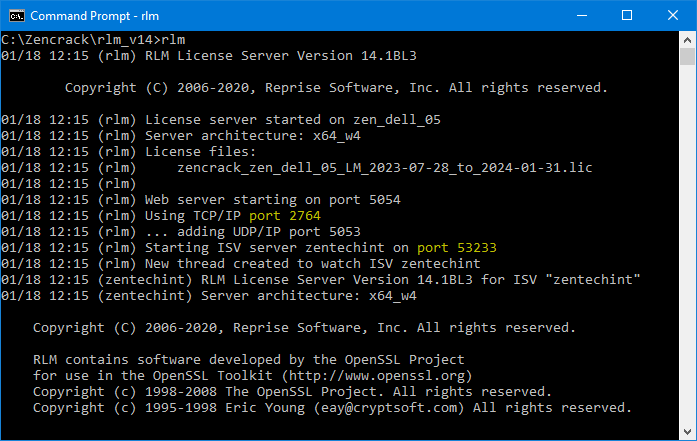
Alternatively, if the license server is being run directly as an executable, rather than as a service, the ports are shown during the startup of the license server. If the license server is running as a service, this startup information can be found in the server log file.
Firewall settings
In order for client machines to be able to access the license server, any firewall on the license server must allow appropriate inbound connections.
For a license server on a Windows machine, the Windows Defender Firewall can be configured in one of two ways:
- Define a Program Exception to allow inbound connections for rlm.exe.
- Define a Port Exception to allow inbound connections for the ports used by the rlm server and zentechint ISV server.
The first method is the simplest as the port method additionally requires that a fixed port number is defined for the ISV server on the ISV line in the license file.
To set a Program Exception inbound firewall rule for rlm.exe requires administrator access and these steps:
- Search for, and open, 'Windows defender firewall with advanced security' from the Start menu.
- In the column on the left, select Inbound Rules.
- In the column on the right, click on New Rule....
- Select Program for the type of rule that you would like to create. Then click Next.
- Select This program path: and use the Browse... button to locate the rlm.exe file that was installed as part of the license server installation. Then click Next.
- Select Allow the connection. Then click Next.
- Check the Domain and Private profiles, and, if you require it, the Public profile. Then click Next.
- Enter a name and description for the rule. Then click Finish.
To use the alternative port method, a similar process should be followed to allow access via a port rule, selecting Port at step 4, followed by setting the TCP ports of the rlm server and zentechint ISV server as Specific local ports.